NOTE
This is a messy notes document for me to refer to while I learn. It is an incomplete tutorial and subject to change.
Let’s get Talos linux installed on Vultr.
In the past, there was a Talos linux Vultr app in their marketplace. This link now 404s. https://www.vultr.com/marketplace/apps/talos-linux This tells us that it has been done in the past and we can make it happen again!
Talos’ documentation website contains Vultr instructions https://docs.siderolabs.com/talos/v1.12/platform-specific-installations/cloud-platforms/vultr
They recommend using vultr-cli. Lucky for us, there is a vultr-cli package in the AUR.
~/Documents/blah pamac search vultr 127 ✘
vultr-cli 3.8.0-1 extra
Official command line tool for Vultr services
~/Documents/blah pamac install vultr-cli 1 ✘
Preparing...
==== AUTHENTICATING FOR org.manjaro.pamac.commit ====
Authentication is required to install, update, or remove packages
Authenticating as: Chris Grimmett (cj)
Password:
==== AUTHENTICATION COMPLETE ====
Synchronizing package databases...
cp: cannot access '/var/lib/pacman/sync/download-nX8gD1': Permission denied
Resolving dependencies...
Checking inter-conflicts...
To install (1):
vultr-cli 3.8.0-1 extra 3.1 MB
Total download size: 3.1 MB
Total installed size: 9.6 MB
Apply transaction ? [y/N] y
Download of vultr-cli (3.8.0-1) started
Download of vultr-cli (3.8.0-1) finished
Checking keyring... [1/1]
Checking integrity... [1/1]
Loading packages files... [1/1]
Checking file conflicts... [1/1]
Checking available disk space... [1/1]
Installing vultr-cli (3.8.0-1)... [1/1]
Transaction successfully finished.
Next we need an ISO with which we will load into Vultr. To get this, we use Talos factory. https://factory.talos.dev/?arch=amd64&bootloader=auto&cmdline-set=true&extensions=-&platform=vultr&target=cloud&version=1.12.4
Factory gives us a link to an ISO, which we then upload to Vultr
vultr-cli iso create --url https://factory.talos.dev/image/376567988ad370138ad8b2698212367b8edcb69b5fd68c80be1f2ec7d603b4ba/v1.12.4/vultr-amd64.iso
Then we list the ISOs we have in vultr and wait for talos to exit ‘pending’ status
vultr-cli iso list ✔ ▼
ID FILE NAME SIZE STATUS MD5SUM SHA512S
UM DATE CREATED
5b3cd904-b904-4871-8f40-af423e1b32db vultr-amd64.iso 0 pending 2
026-03-02T21:34:24+00:00
a few minutes later…
vultr-cli iso list ✔ ▼
ID FILE NAME SIZE STATUS MD5SUMS
HA512SUM D
ATE CREATED
5b3cd904-b904-4871-8f40-af423e1b32db vultr-amd64.iso 314912768 complete aa8d728
42e4355e27219089a91a1b957 66e7849168841f98670be12baa675e797e2b2ca9c935d7e83fb024c0b3f456084360599
00c9aa61374a597b03b372c71e79660321e692009fc9e2ffa914f6740 2026-03-02T21:34:24+00:00
Your ISOs are also listed on the web UI https://my.vultr.com/iso/
Problems
unary rpc error: code = Unimplemented desc = method Bootstrap not implemented
https://github.com/siderolabs/terraform-provider-talos/issues/213
The issue is that we are trying to bootstrap before the machine config has been applied to the node.
A lot happened
…and I didn’t document much of it.
Traefik Ingress Class
Problem detected! The traefik service is not getting an external IP.
kubectl get svc -n traefik-namespace traefik -o yaml
NAME      TYPE           CLUSTER-IP      EXTERNAL-IP   PORT(S)                      AGE
traefik   LoadBalancer   10.103.68.239   <pending>     80:30897/TCP,443:30805/TCP   21h
The EXTERNAL-IP column is stuck on pending for 19+ hours. It’s safe to say that it will not get one even if I wait 1 century. I need to intervene!
Found this helpful blog post which explains the situation.
https://oneuptime.com/blog/post/2025-12-16-kubernetes-external-ip-pending-nginx-ingress/view
Because I’m not running on Vultr Kubernetes Engine (VKE), there is no provisioner in the cluster that will assign an external IP.
External load balancer
- https://kubernetes.io/docs/tasks/access-application-cluster/create-external-load-balancer/
- https://github.com/vultr/vultr-cloud-controller-manager/blob/master/docs/load-balancers.md
ipxe chainloading
I am setting up my vultr instances using terraform. here is how I do it
variable "talos_vultr_ipxe_chain_url" {

	description = "The ipxe chain used to set the kernel command line and other settings"
	type = string
	default = "https://pxe.factory.talos.dev/pxe/376567988ad370138ad8b2698212367b8edcb69b5fd68c80be1f2ec7d603b4ba/v1.12.4/vultr-amd64"
}

resource "vultr_instance" "talos_worker" {
	count = 3
	hostname = "talos-k8s-worker-${count.index}"
	plan = "vc2-2c-4gb"
	region = "ord"
	backups = "disabled"
	ddos_protection = "false"
	iso_id = vultr_iso_private.talos_iso.id
	enable_ipv6 = true
	label = "talos worker ${count.index}"
	tags = ["k8s", "talos", "grimtechnet", "worker"]
	ipxe_chain_url = var.talos_vultr_ipxe_chain_url
}
Problem: Boot error on Vultr, during the ipxe process. This is apparent when viewing the instance console.
Custom OS selected.
Please mount an ISO via your control panel, or use iPXE to network boot https://pxe.factory.talos.dev/pxe/376567988ad370138ad8b2698212367b8edcb69b5fd68c80be1f2ec7d603b4ba/v1.12.4/vultr-amd64 talos.platform=vultr net.ifnames=0 init_on_alloc=1 slab_nomerge pti=on consoleblank=0 nvme_core.io_timeout=5294967295 printk.devkmsg=on selinux=1 module.sig_enforce=1 https://pxe.factory.talos.dev/pxe/376567988ad370138ad8b2698212367b8edcb69b5fd68c80be1f2ec7d603b4ba/v1.12.4/vultr-amd64... Operation not permitted (http://ipxe.org/410de13c)
Yikes.
I went to the ipxe.org/410de13c link but it wasn’t very helpful. All that error code means is that there was a fatal error; it doesn’t give any specifics.
So what do I do next?
First, I tried manually running the ipxe commands in Vultr’s noVNC console. I got the same error back, which tells me that opentofu is correctly sending the command in the same way we are manually sending it. So next we have to figure out why ipxe is not able to follow through with the ipxe chain boot.
Just so we’re on the same page, the ipxe_chain_url is provided by talos, on their factory.talos.dev website. You can visit this link and read the text content of the ipxe chain.
I’ve pasted the text content below.
#!ipxe

imgfree
kernel https://pxe.factory.talos.dev/image/376567988ad370138ad8b2698212367b8edcb69b5fd68c80be1f2ec7d603b4ba/v1.12.4/kernel-amd64 talos.platform=vultr net.ifnames=0 init_on_alloc=1 slab_nomerge pti=on consoleblank=0 nvme_core.io_timeout=4294967295 printk.devkmsg=on selinux=1 module.sig_enforce=1
initrd https://pxe.factory.talos.dev/image/376567988ad370138ad8b2698212367b8edcb69b5fd68c80be1f2ec7d603b4ba/v1.12.4/initramfs-amd64.xz
boot
I wanted to try again with the copy-pasting into the Vultr instance’s noVNC console. I went line by line, and found out that the iPXE process chokes up on the following line.
kernel https://pxe.factory.talos.dev/image/376567988ad370138ad8b2698212367b8edcb69b5fd68c80be1f2ec7d603b4ba/v1.12.4/kernel-amd64 talos.platform=vultr net.ifnames=0 init_on_alloc=1 slab_nomerge pti=on consoleblank=0 nvme_core.io_timeout=4294967295 printk.devkmsg=on selinux=1 module.sig_enforce=1
Let’s find out exactly which part is failing, by starting with no arguments and see if we can get a success.
kernel https://pxe.factory.talos.dev/image/376567988ad370138ad8b2698212367b8edcb69b5fd68c80be1f2ec7d603b4ba/v1.12.4/kernel-amd64
Operation not permitted (http://ipxe.org/410de13c)
It’s frustrating, but we’ve made progress. We’ve narrowed down the problem to be something related to this kernel stanza.
Could it be that iPXE is struggling with https? let’s try with http.
kernel http://pxe.factory.talos.dev/image/376567988ad370138ad8b2698212367b8edcb69b5fd68c80be1f2ec7d603b4ba/v1.12.4/kernel-amd64
Yep, that works!
iPXE> kernel http://pxe.factory.talos.dev/image/376567988ad370138ad8b2698212367b8edcb69b5fd68c80be1f2ec7d603b4ba/v1.12.4/kernel-amd64 http://pxe.factory.talos.dev/image/376567988ad370138ad8b2698212367b8edcb69b5fd68c80be1f2ec7d603b4ba/v1.12.4/kernel-amd64.... ok
Wow. Ok then. Does it work with http with all the arguments too?
`kernel http://pxe.factory.talos.dev/image/376567988ad370138ad8b2698212367b8edcb69b5fd68c80be1f2ec7d603b4ba/v1.12.4/kernel-amd64 talos.platform=vultr net.ifnames=0 init_on_alloc=1 slab_nomerge pti=on consoleblank=0 nvme_core.io_timeout=4294967295 printk.devkmsg=on selinux=1 module.sig_enforce=1
… ok
Yes, it does!
Side quest: see if netboot.xyz works using https
One by one, I pasted these lines into the Vultr instance’s noVNC console. (I derived these commands from https://boot.netboot.xyz/)
set conn_type https
chain --autofree https://boot.netboot.xyz/menu.ipxe || echo HTTPS failed... attempting HTTP...
set conn_type http
chain --autofree http://boot.netboot.xyz/menu.ipxe || echo HTTP failed, localbooting... exit
Turns out, it’s not just talos iPXE that is failing to boot via https— It’s netboot.xyz too! I was able to boot into netboot using http, but not https.
So there’s our problem. HTTPS is not working on Vultr’s iPXE. Can we workaround this somehow?
Searching around, I found this Vultr iPXE documentation. https://docs.vultr.com/ipxe-boot-feature
Bad news, all the examples use http, not https. 😞
iPXE supports HTTPS, but it does so only when compiled with certain build flags. See https://ipxe.org/crypto for more info. It seems that Vultr did not compile their iPXE with the necessary flags.
Let’s poke around with the iPXE show command. If we can use https, we should be able to show the crypto settings listed at https://www.ipxe.net/cfg.
iPXE> show trust
Could not find "trust": No such file or directory (http://ipxe.org/2d0c203b)
iPXE> show version
builtin/version:string = 1.21.1+ (gf43c2)
Vultr is using iPXE v1.21.1 released in 2020. Wow, in computer terms, that’s ancient!
I think only Vultr can fix this, but will Vultr even care if I raise an issue? iPXE is an advanced tool and few of their customers would benefit from compiling iPXE with the necessary option.
#define DOWNLOAD_PROTO_HTTPS /* Secure Hypertext Transfer Protocol */
Heck, maybe they’re avoiding HTTPS support because of some vulnerability such as https://www.cve.org/CVERecord/SearchResults?query=ipxe. Adding HTTPS does in fact introduce complexity to their system.
I’m going to ask anyway. Can’t hurt to ask.
Hi guys,

I am using Vultr to experiment with Talos linux clusters. I am running into the problem where Vultr iPXE cannot use Talos's iPXE boot chain because Vultr's copy of iPXE does not support HTTPS. iPXE supports HTTPS only if compiled with `DOWNLOAD_PROTO_HTTPS`. (https://ipxe.org/buildcfg/download_proto_https)

It looks like Vultr uses iPXE v1.21.1+ (gf43c2) which was released in 2020. At that time, DOWNLOAD_PROTO_HTTPS defaulted to false. In more recent versions of iPXE, DOWNLOAD_PROTO_HTTPS defaults to true. https://github.com/ipxe/ipxe/commit/05cb930466119d1fea6e9b4d4c13edb4df7ff4d0

Would it be possible to provide iPXE with HTTPS support enabled (i.e., with DOWNLOAD_PROTO_HTTPS compile time option turned on)?

Thanks!
Support ticket created! We’ll wait and see what they say.
A workaround
I got an idea. What if we first boot into netboot.xyz and use their iPXE commandline? Theirs is probably more up to date than Vultr’s, and I would assume they would have compiled theirs with HTTPS.
Here’s how we do it. On Vultr iPXE, we boot into netboot.xyz
iPXE> chain --autofree http://boot.netboot.xyz/menu.ipxe
Once we get netboot.xyz’s menu, we select iPXE shell under Tools. Then we verify that we have a newer iPXE version.
iPXE> show version
version:string = 3.x
Now we can paste these lines one by one (IMPORTANT!) and run each command one by one.
#!ipxe

imgfree
kernel https://pxe.factory.talos.dev/image/376567988ad370138ad8b2698212367b8edcb69b5fd68c80be1f2ec7d603b4ba/v1.12.4/kernel-amd64 talos.platform=vultr net.ifnames=0 init_on_alloc=1 slab_nomerge pti=on consoleblank=0 nvme_core.io_timeout=4294967295 printk.devkmsg=on selinux=1 module.sig_enforce=1
initrd https://pxe.factory.talos.dev/image/376567988ad370138ad8b2698212367b8edcb69b5fd68c80be1f2ec7d603b4ba/v1.12.4/initramfs-amd64.xz
boot
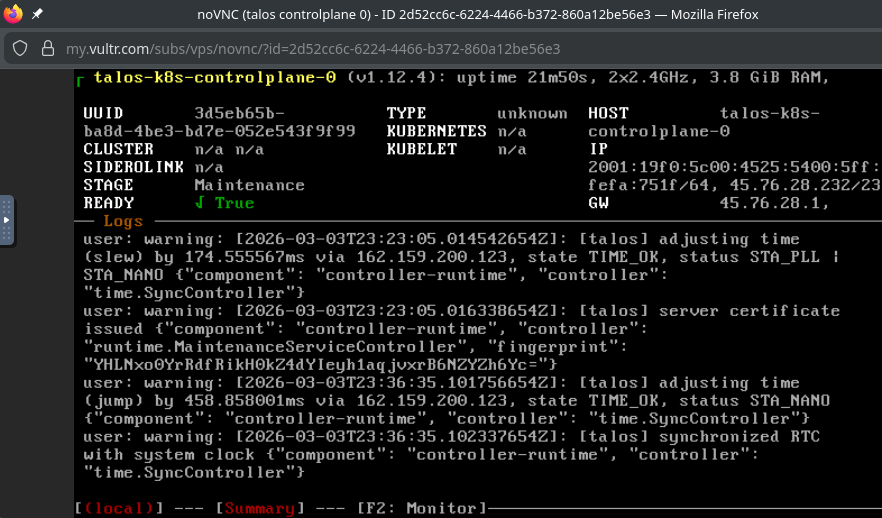
And just like that I was running Talos linux in maintenance mode.
Now, we haven’t solved the problem with this workaround. We’ve implemented a solution, but it has a bunch of manual steps. If we’re going to scale up and down the cluster every so often, we need this process to be a iPXE oneliner that does everything without human intervention. Let’s develop that.
maybe Vultr iPXE does support HTTPS after all
Maybe it’s just a certain cipher that is unsupported.
(@see https://github.com/ipxe/ipxe/discussions/1078) (@see https://github.com/ipxe/ipxe/discussions/1495)
Using the output from a ssllabs scan, and the ipxe documentation at https://ipxe.org/crypto, it looks like there are some overlapping supported TLSv1.2 ciphers that should be compatible.
TLS_ECDHE_RSA_WITH_AES_128_GCM_SHA256 and TLS_ECDHE_RSA_WITH_AES_256_GCM_SHA384.
Maybe the issue is with Trusted root certificates?
talos-cloud-controller-manager
How many CCM do I need?
One question I had was, “Do I need talos-cloud-controller-manager AND vultr-ccm?” The anwer is yes.
Failing to deploy via Helm via kluctl
Errors:
 kube-system/ServiceAccount/talos-cloud-controller-manager-talos-secrets: failed to patch kube-system/ServiceAccount/talos-cloud-controller-manager-talos-secrets: no matches for kind "ServiceAccount" in version "talos.dev/v1alpha1"
This one annoys the fuck outta me because I didn’t have this issue the first time I deployed it. What changed? Why is it failing on this new cluster?
Solution: the control planes need machine.features.kubernetesTalosAPIAccess.enabled = true. @see https://github.com/siderolabs/talos-cloud-controller-manager/discussions/16
Helm deployment fails with error
Errors:
 kube-system/ServiceAccount/talos-cloud-controller-manager-talos-secrets: failed to patch kube-system/ServiceAccount/talos-cloud-controller-manager-talos-secrets: no matches for kind "ServiceAccount" in versio
n "talos.dev/v1alpha1"
I think this issue is caused by a newer Talos API that is incompatible with the api specified in talos-cloud-controller-manager.
I saw this error when I upgraded from talos v1.12.4 to v1.12.6.