2026-03-04
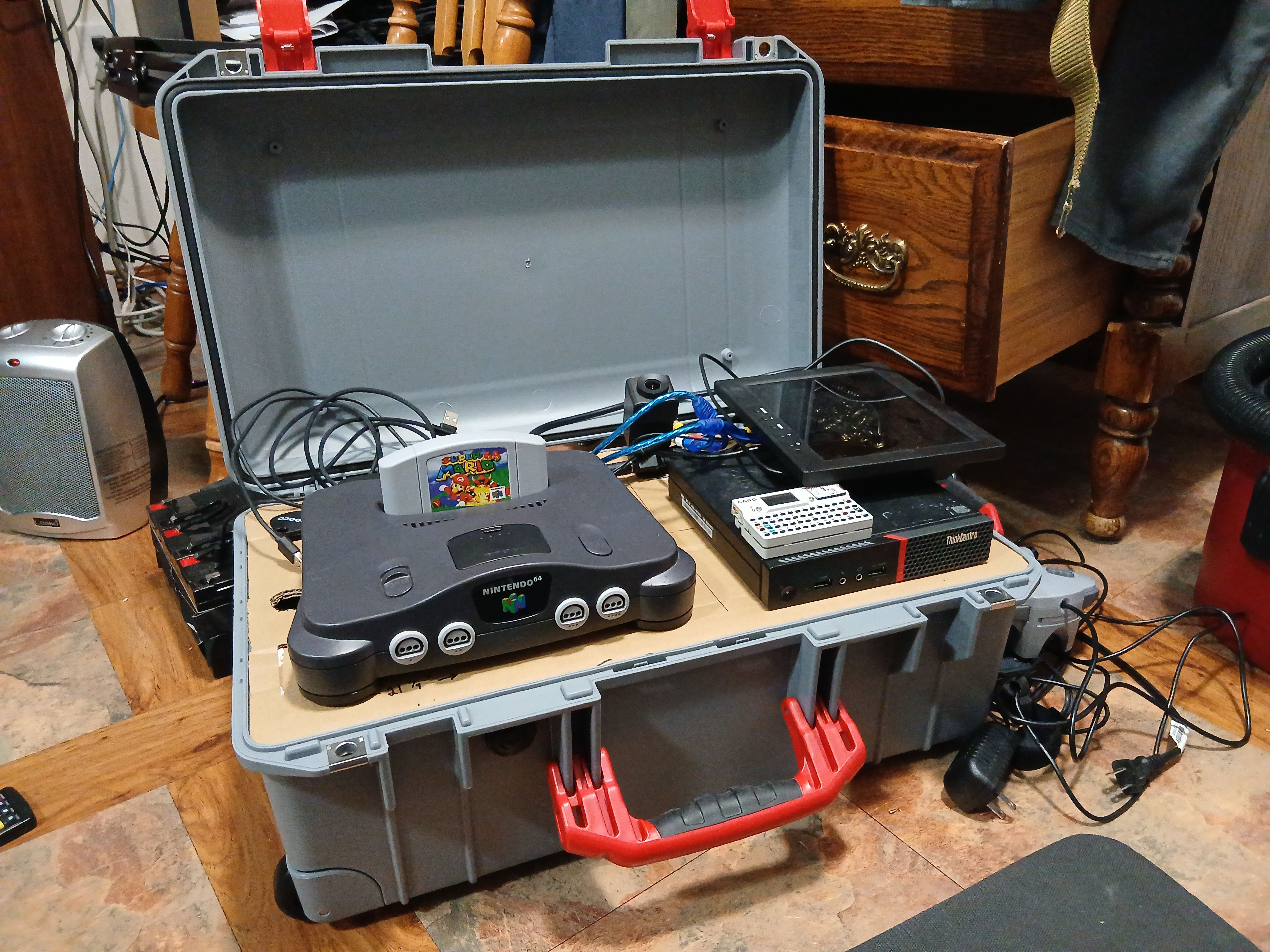
I have acquired 108 stars in SM64! I have only 12 castle secret stars remaining, which I found an IGN guide for. Reminds me of the old days where we would borrow magazines from friends or the Library to complete difficult games. I’m recording the gameplay and webcam footage of the entire run, which has been progressing in little chunks every dew days. Look forward to that video!
Ok onto the case. We have a table, camping chair, and 2 telescoping stools. We have a cardboard placeholder template of the platform/shelf and a couple screws anchoring the N64 to the cardboard.
There are lots of constraints to mounting everything in the case. The cables take a lot of space, the lid has to be able to close, there is only so much surface space to work with…
The idea right now is to come up with a 2 stage setup, where the N64 in stage 2 is fully deployed and able to be played, and stage 1 is where the N64 is recessed into the case and stored for transport.
The same stowage has to occur with the PC case too, which needs to be out of the way so the monitor/lid/webcam/mic combo can close.
The idea for the PC is to have it permanently recessed under the level of the shelf. This way, a selection games can be displayed to the right of the console while the case is in stage 2 (game mode.)
I ordered some Gorilla mounting tape, which will be necessary to secure the monitor, mic, and webcam to the lid. I’m having second thoughts about that— maybe I should get Velcro instead, so I can pull things off, reposition, or maintain them. I think the monitor especially would benefit from removability because that one has so many connections on the bottom which may need to be swapped out at some point.
The first challenge that I want to tackle is the N64 stage 1. I think it will be the most complex, and I like doing the most difficult thing first. Right now, I’m thinking of creating an upper and lower shelf system. The upper shelf section that holds the console would be detachable, shimmied under the remaining upper shelf section, then lowered down and constrained by four corners of a lower shelf system. This way, the N64 would be secure for transport, and out of the way of the lid.
Easier said than done, but that’s where I’m at right now. I think we can do it and I think it will be great!
This is a difficult project for me in the physical realm, but I’m doing it because it’s worth it! I’ve been dreaming of having this setup that I can take anywhere and play with friends and family. I’m really excited to have it complete so I can start making new memories with friends and family on an old console.
Thinking ahead, once we get the cardboard template finalized, we could commission Ponoko to cut us a panel that matches our case. Material wise, I’m thinking stone acrylic or Bamboo premium veneer MDF or Amber Bamboo Plywood or Walnut Premium Veneer MDF
2026-07-28
We are once again progressing! Today I re-designed a laser cut tray in FreeCAD to hold up the console. I sent the design off to Ponoko so soon I’ll have it cut out from a sheet of MDF. I doubt I’ll get it right the first try, but I’m excited for it!
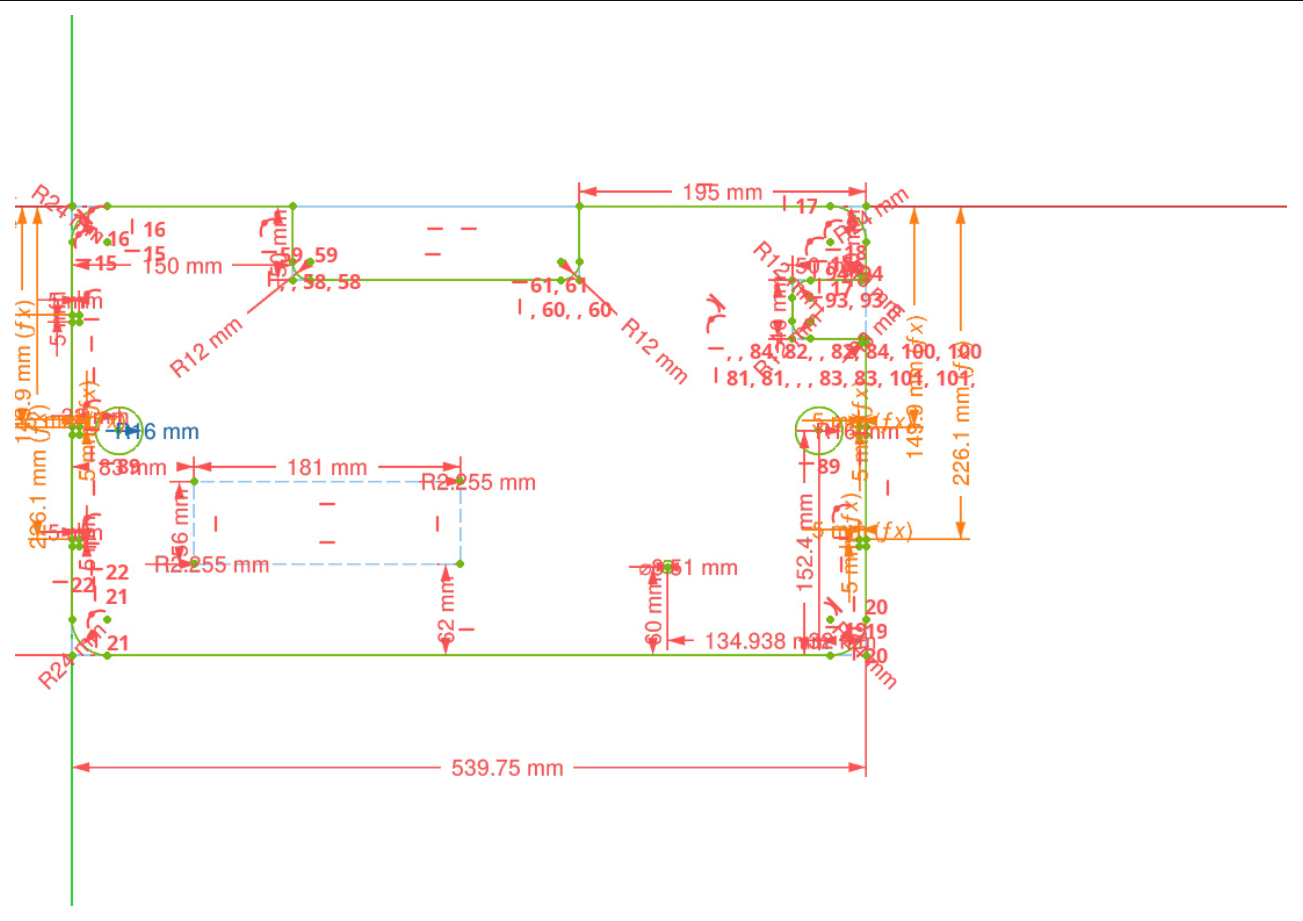
The other day, I designed a double VESA mount for the lid of the Pelican case. One mount is for the display, the other is for the recording PC.
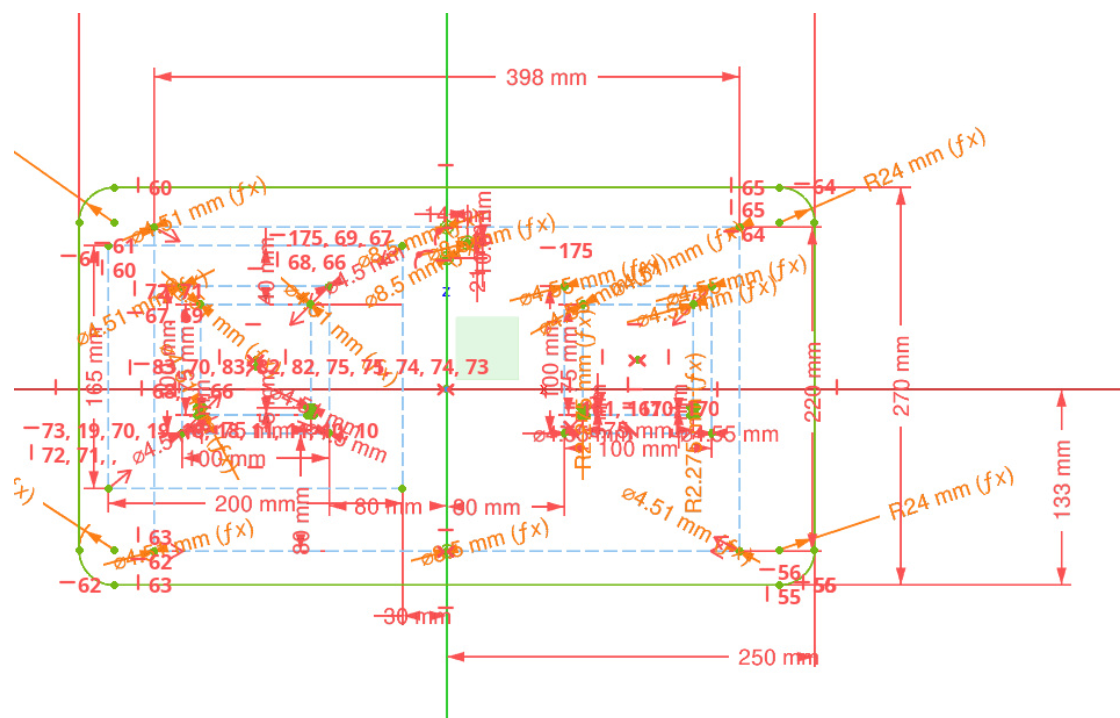
I’m relocating the PC to the lid, because it gets too hot in the depths of the Pelican case. In the future, I’m switching from a Thinkcentre M600 to a GPD MicroPC 2 which will consolidate functionality, increase ease-of-use, and eliminate some parts like the M5 Cardputer keyboard.
After using the setup for a few months, I find that I want to see OBS while I stream. It’s good this way to ensure that video and audio signals are making their way to the recording. It’s also great for peace of mind to ensure that my startup script is working and that OBS is actually recording and has disk space.
Bill of Materials
| Qty | Make | Model | Desc | ASIN | Cost | Buy links |
|---|---|---|---|---|---|---|
| 1 | Acer | TH-AV-AGTCC07 | HDMI capture card | B0FZKNK414 | ||
| 1 | ModRetro | M64 | Game console | |||
| 1 | Pelican | 015350-0000-180-321 | Pelican 1535 Silver Case - Empty, Red Push Button Handle & Latch Set (Installed) | B0CPQ95ZH8 | ||
| 2 | Helinox | 10555 | Chair Zero Large | B0BT8MHHZD | ||
| 1 | SBTPXYZ | Laser cut MDF Pelican 1535 lid mounting bracket | ||||
| 1 | SBTPXYZ | Laser cut MDF Pelican 1535 Console tray | ||||
| 2 | SBTPXYZ | 3D printed Pelican 1535 aluminum leg mount | ||||
| 4 | Lid mount thumb screws | |||||
| 2 | HDMI cable, 20cm | |||||
| 1 | Eyoyo | EM08B | 8” monitor. Brand also known as JINSWY | B01FHDL1DE | ||
| 2 | Nintendo | NUS-005 | Nintendo N64 Controller | |||
| 1 | JUXIN | CCFM01 | 90 degree USB-C cable | B0F6796XJ2 | ||
| 1 | Huddly | GO | Super wide angle webcam | B076BKP7PY | ||
| 2 | mcmaster | 90200A546 | Steel Knurled-Head Thumb Screw for webcam & mic | |||
| 1 | SAMSON | SAGOMIC | Portable USB Condenser Microphone | B001R76D42 | ||
| 1 | Anker | AK-848061023787 | USB 3.0 Hub | B07L32B9C2 | ||
| 1 | GPD | MicroPC 2 | Streaming/recording computer | B0FNQMVL4L | ||
| 1 | Jackery | JE-300E | Power station | B082TMBYR6 | ||
| 1 | Fosmon | C-10723US | 4 outlet surge Protector w/ 3 ft cable | B07F96Q43D | ||
| 1 | Amazon Basics | L6LAC036-DT-R | 20ft Extension cable | B076KFTT5B | ||
| 1 | KOUO, SKYNEST, WMBOOX, etc. | camping table 01 | table for carts and snacks | B0G5YY5S62 | $29.99 | 1 |
Experimental materials
If we DIY some legs for the Pelican case to reduce weight and stowage size, we could use these parts.
| Qty | Make | Model | Desc |
|---|---|---|---|
| 2 | mcmaster | 9056K66 | Aluminum tubing |
| 4 | mcmaster | 2517T981 | rubber feet |
| We are missing some sort of mechanism to link the legs together. I was thinking of 3D printing a custom mount with holes that the tubing slides into. The 3D printed part would both mate with the bottom of the case and anchor the tubes in the proper orientation to prop up the case. |
At the moment, it would cost a lot to design and assemble this stuff. Just one 3’ aluminum rod is like $40 and for that price I could buy 2 SKYNEST tables. So we will proceed with this only if we are very passionate about it. It would also help to find a less expensive alternative to what McMaster Carr offers. Maybe take a sacrificial China made table or chair with sturdy aluminum legs that we could disassemble and repurpose it’s parts.
OH, I know. Next time we see a broken camp chair, snatch it from the trash and see if we can repurpose it’s legs.
OmniOne Pocket PC?
Could this be a good streaming/recording computer? https://www.youtube.com/watch?v=wCKJlJ3kOKw
2026-08-02
I got a VESA mount for my Thinkcentre M600, and mounted it to the upper board. Looks good! Finally I can close up the bottom tray because now there isn’t a heat source under the N64 contributing to the heat. My N64 crashes when it gets too warm, so this should alleviate that.
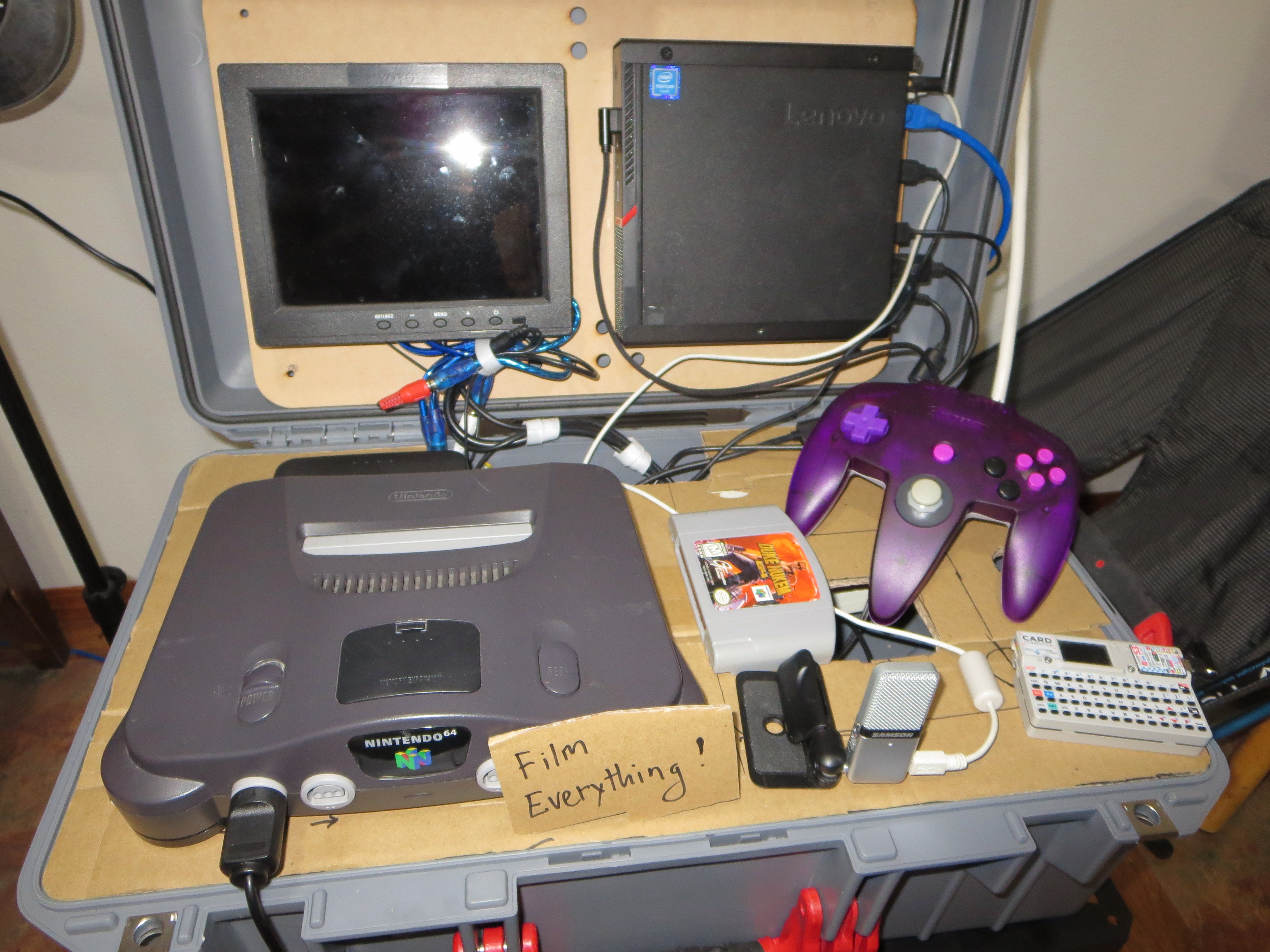 Previously when the computer was down below in the case, the fan would reverberate in the case and the mic would faintly pick it up. The M700 fan is closer to the mic now, but it is no longer enclosed. We’ll see if the noise gets into the mic more or less this way. If it’s still a problem, I could insulate the mic with some noise panels. Or maybe I’ll do nothing, since I’m planning on upgrading to an Audio Technica BPHS1.

Bigger monitor idea
We could upgrade to a 12” monitor
2026-08-03
ModRetro M64 received! Unfortunately I realize that my Eyoyo 8” display will NOT work with this console! M64 basically expects a 720p or greater display
Could we use this one maybe? kinda pricy, but it’s in the niche zone of small and still high nits https://www.amazon.com/Portable-Monitor-1200-Laptop-FreeSync/dp/B0FZT2V5HW?crid=3H3L24EHANJQ7&dib=eyJ2IjoiMSJ9.jusTTqnsLiAREx0rIEOFPBgs2TUABNWpBtfhU3t_DencpmoE88TuV5-Mzbz01iA41CpXUtmFq1vMCXIYvdhpXkPZGO9_i92zb74-Bql5nPoOcHIiidWhg6J1TjcvQRwpLJ8XgjvLUQdo1xykwaBMcdv5rgrPwfihUlO63VtJ9FJXTG95kwelvT8oUBt7qveeJ6-AEqP3zHVpu9OOEQZn0gWJELnVk_kl3SYuq81j194vk3IZQgcMU_uxtnrAEZu8DZqsSUDCIvOReHvbl76MOrVsrRKVc6ju821PWMGjUck.VbmVWk_LpK19bfSzp4KDUcGr_R8uoA9nJHg48MBUrs4&dib_tag=se&keywords=nits%2B1200%2B1080p%2Bhdmi%2Bvesa&qid=1785800347&s=electronics&sprefix=nits%2B1200%2B1080%2Bhdmi%2Bves%2Celectronics%2C211&sr=1-3&th=1
2026-08-05
I think my lid isn’t going to be able to close because the platform is occupying the lid space. I think I need to use a design like the following.
 source: https://www.datapro.net/products/pelican-1535-air-case.html
2026-09-03
I learned that there’s a MOLLE panel for 1535 case. It’s got these screws which are designed for the holes. I need these screws!
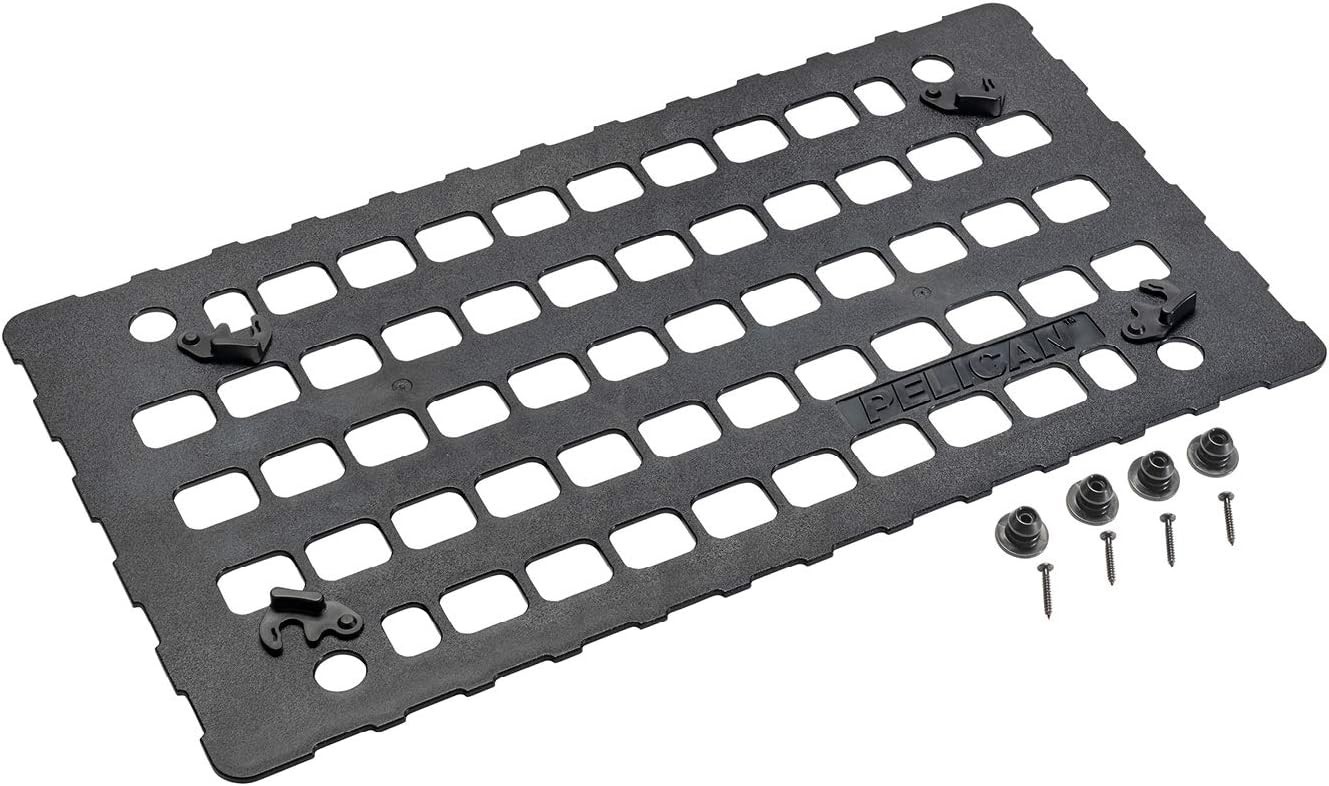
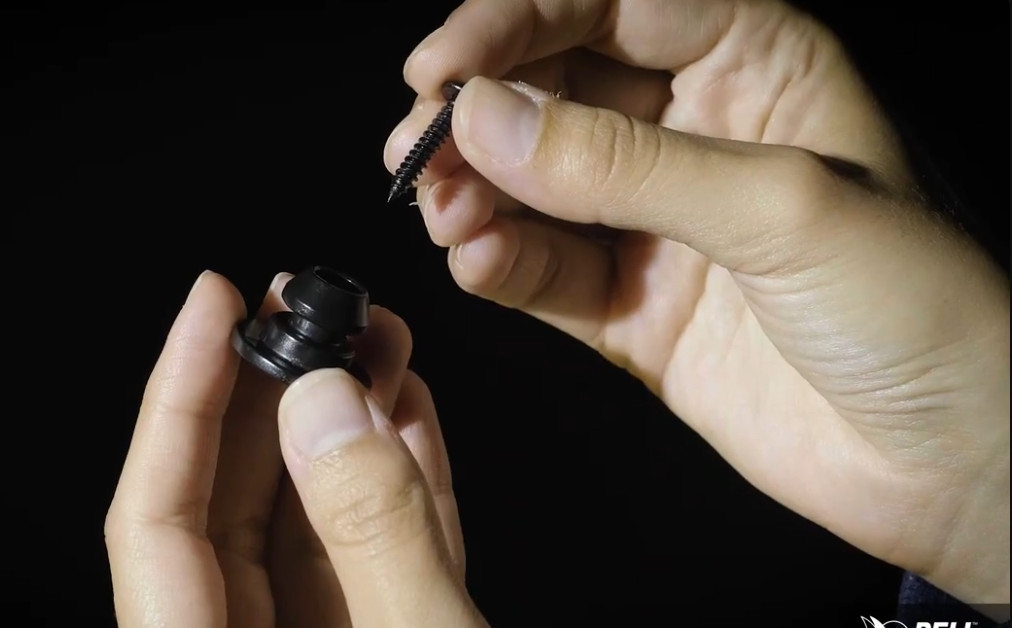 These screws. (Pele brand) What size are these?
source: https://www.youtube.com/watch?v=NSCXCVuleqc
Ok so we want to bring this project all together. We need POWER!
Stuff we need
- power station with 3 outputs (pc, monitor, n64)
- USB-C to 5.5mm x 2.5mm DC barrel jack (for monitor) https://www.amazon.com/Compatible-5-5x2-1mm-Charger-Outdoor-Travel/dp/B0BJFKND59?dib=eyJ2IjoiMSJ9.O6oF-kgB3UXCZ70iEqs_r-grea0rVnWK0twpQz-_jVqQnxYzqmRvkwQ05icvaDCFkzH1V3TM5htQolV9PGoWT3tc4VDPoWSrud6ZcU31Av_74LyBTb4-lMtjL-FBULQ1n3A2yM0OAKaRdECgmz39cmZgyu4ODoWO7CXH76zUzBPpOmi92crPp0WQB3h2CsMDGA3oMGFyj6azp8RcqmuHrtDZxaZAG7ZITZOdTuMigZg.mklmqTZpVgc3i15WKOLRDl1HwE4vact5hvv8Q6zeA4U&dib_tag=se&keywords=USB-C%2Bto%2B5.5mm&qid=1789021677&sr=8-2&th=1
- N64 USB-C PSU https://www.aliexpress.us/item/3256812205071720.html
- Thinkpad DC adapter https://www.ebay.com/itm/155397877951
With these parts, we can eliminate all AC, which should be more efficient on the power draw. We also eliminate the bulky wall warts and the surge protector.
2026-09-09
Thinking about nice-to-haves. What if we could sqeeze in a larger monitor? here’s a 9.7” 4:3 monitor https://amzn.to/4gVbzoO
I got curious about my Eyoyo monitor. It’s been flickering. Is there something wrong with it? Lemme void the warranty and open it up.
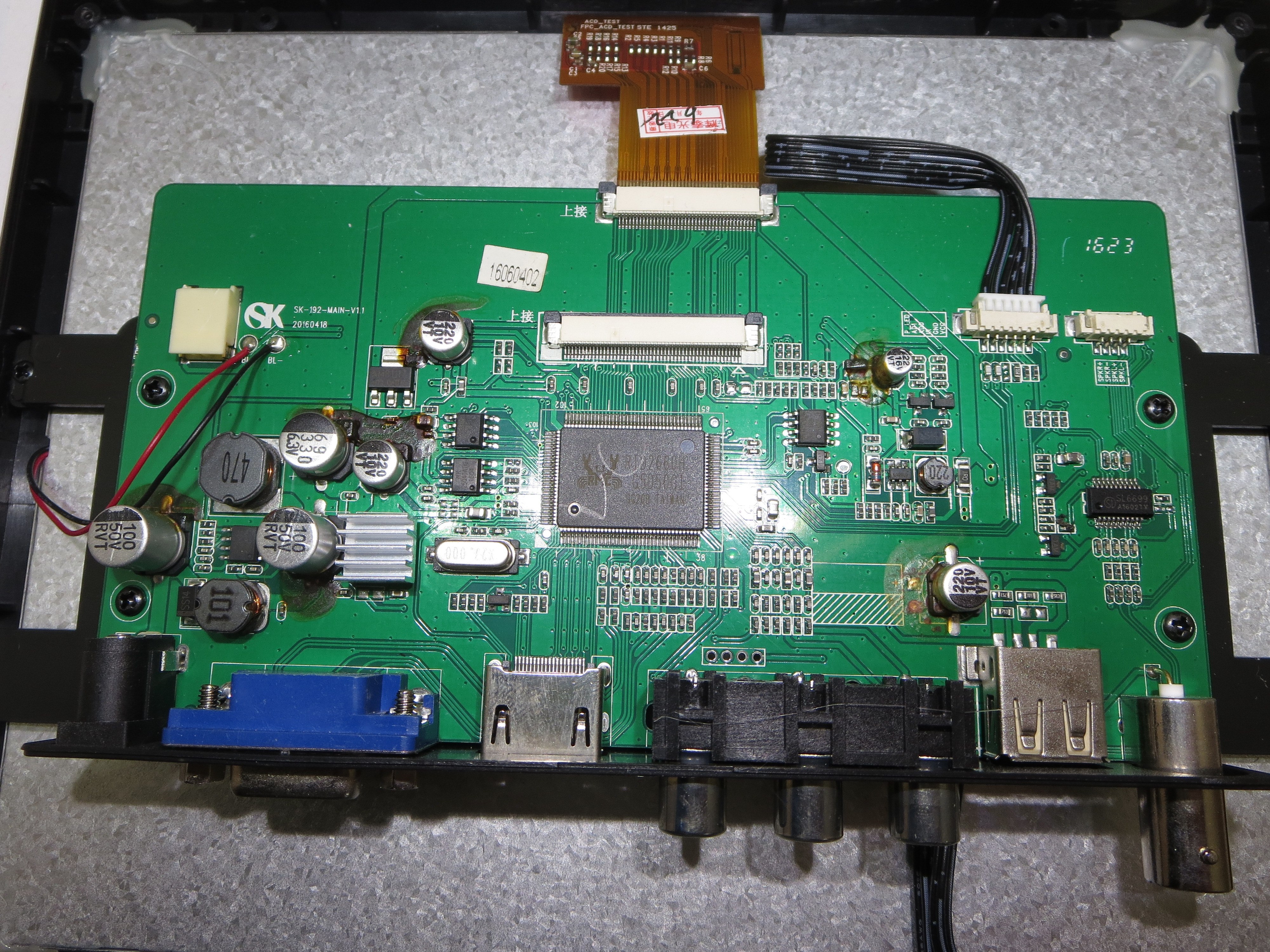 Eww, what’s that yellow and black goop around the capacitors? Are those capacitors leaking, or is that factory glue? It doesn’t look like glue to me. IDK if I should repair this, or just buy a new display. This one cost me 60 new. Would I be paying that much in capacitors? IDK. It still works and it only flickers when it’s not displaying video so I’m putting that off for now.
Also I got thinking, could I automate the display input switching? It’s kind of a pain in the ass to switch inputs on this thing. There are four inputs. AV, VGA, HDMI, and Ypbpr. Switching inputs takes about 5 seconds inbetween cycling through each input. Painfully slow, and I often click too many times and miss the input I want so I have to cycle through them a second time.
Could I perhaps hack into this thing using what looks like a JTAG or UART header above the composite connector? Maybe send some commands to jump directly to the input I want? I have never done something like that, but I want to try. I would need some tools. A logic analyzer and a multimeter, I think?
Might be more trouble than it’s worth, but it would be super cool to be able to automatically switch to the HDMI input when I activate keyboard or mouse mode on my Cardputer.
Oh yeah, my custom cardputer firmware! I’m super proud of this. I split this display into 4 quadrants. Top left shows the currently active OBS scene. Top right shows when OBS is recording, IDLE, or Waiting for connection. Bottom left shows audio input levels. Bottom right shows recording duration, and disk usage.
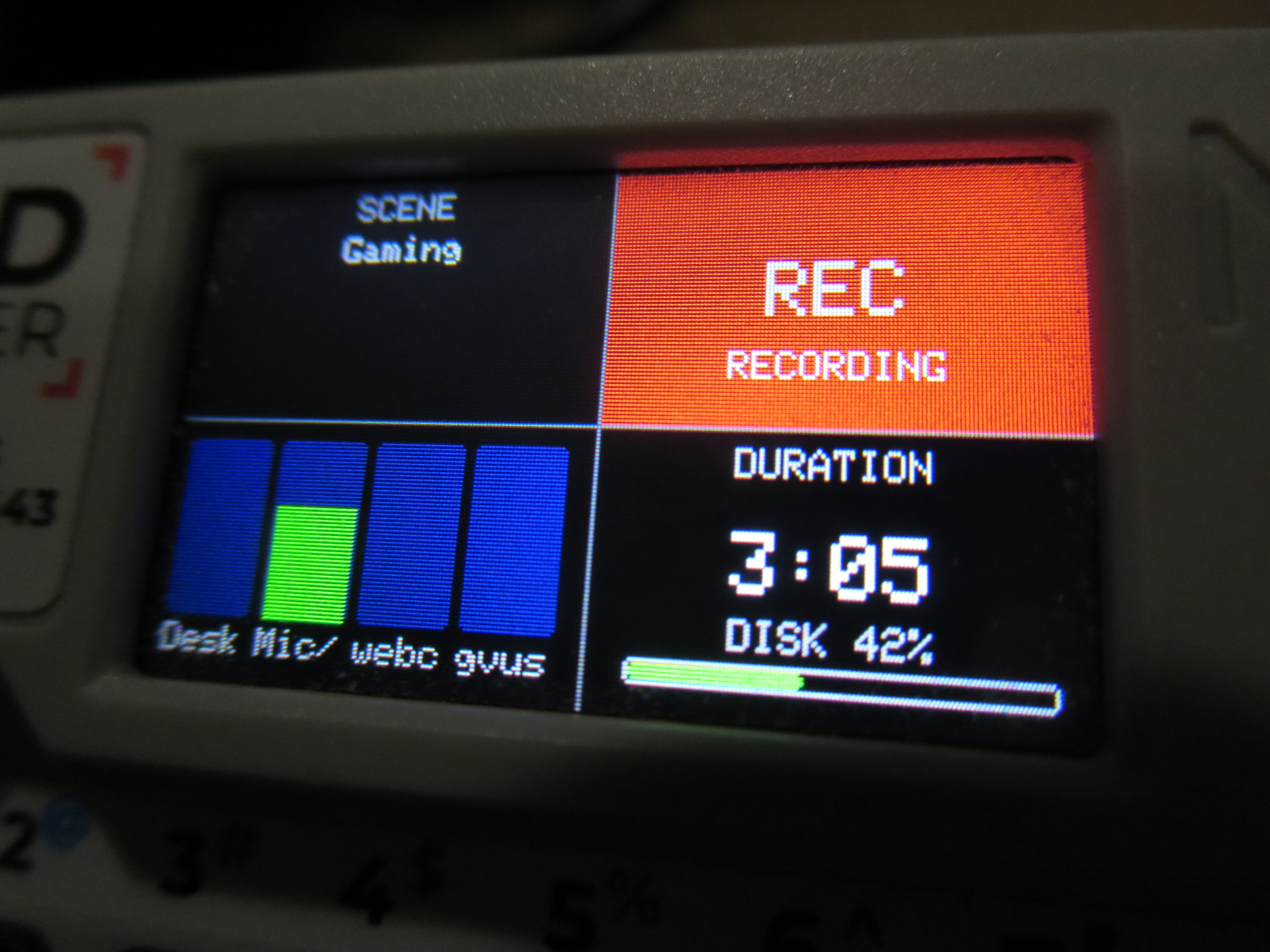
This thing is awesome! It already saved me from losing a recording session, because the live display helped me notice that the game audio source was muted.
The cardputer has a magnetic back, so it sticks right on my recording PC, or the table that holds the Pelican case.
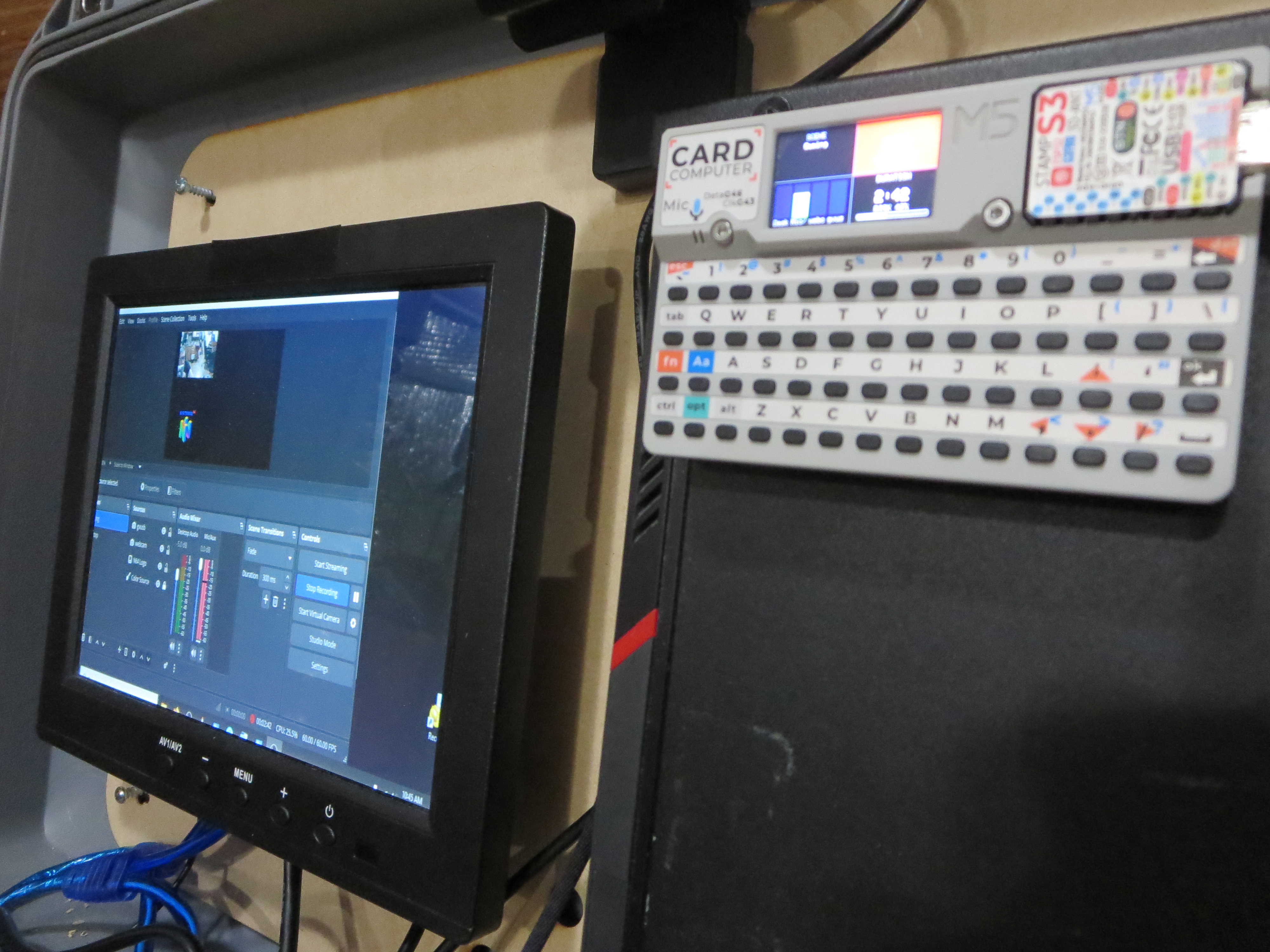
There’s more! It also has shortcuts to shutdown the computer, start/stop the OBS recording. AND it has keyboard/mouse mode so I can use the cardputer as a tiny keyboard and mouse for the recording computer. That way when I go portable, I don’t need to lug around extra peripheals.
I also picked up one of these monstrocities— Super GB Booster.
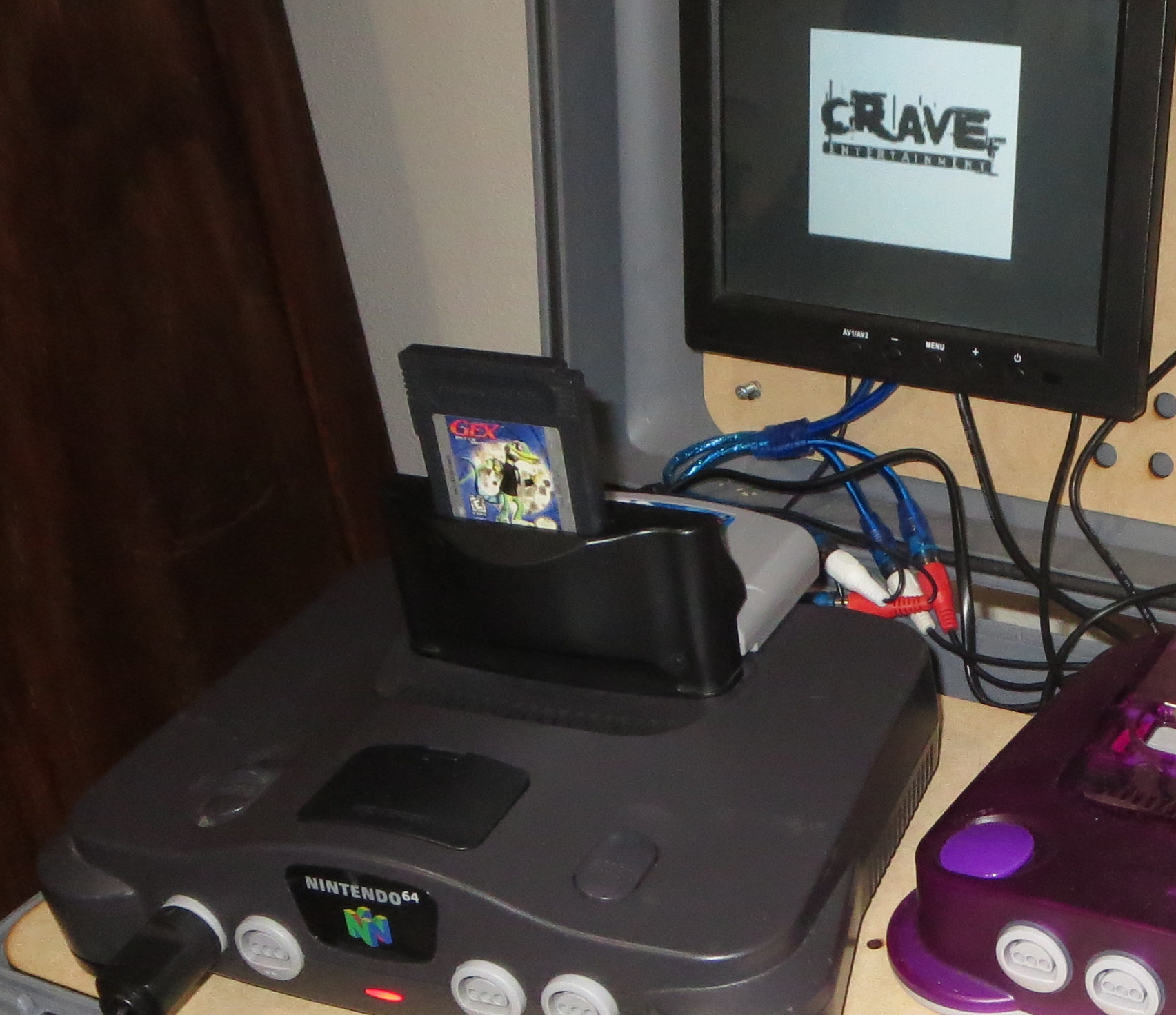 See how there’s a MarioKart 64 cartridge back there?
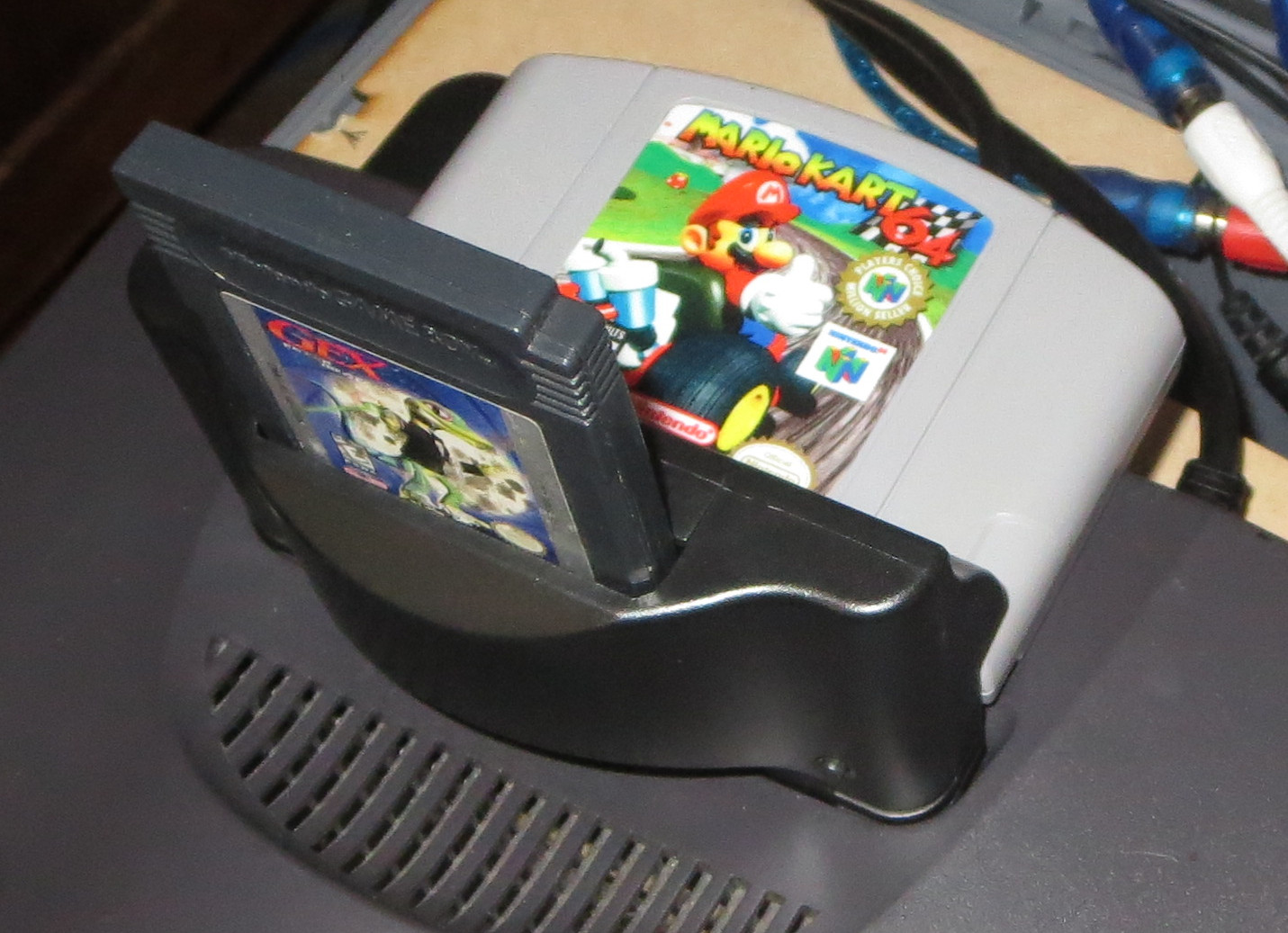
Yeah, it’s actually connected to the Super GB Booster. that’s how this unlicensed hardware adapter tricked the console into booting. N64 cartridges have little chips in them that was like Nintendo’s DRM. If the console doesn’t detect the authentic chip, the console won’t boot the game.
Super clever of the devs who made the Super GB booster, without having to pay Nintendo for licensing. Super weird to look at, though!
I had my eye on these for awhile, because it’s been a fantasy of mine to play physical GB carts on a TV via N64. It works pretty well, with one huuge caveat. No gameboy audio whatsoever! Instead, you get this annoying looping song.
It’s like, annoying to listen to the music, and it’s annoying to play the game in silence. Ahhh, I can’t win!
Anyway, the Super GB Booster is a tanget. Not work, it’s just a fun distraction. I’ll probably make a video about it eventually.
I FINALLY GOT A PLAN FOR POWER!
Right now, I’m tethered to the wall. That was never the goal with this project— I want to go outside and touch grass with it!
So here’s my plan. We use one of these battery power stations, which outputs DC. Either a Ecoflow TRAIL 300 or Anker Solix C300. Haven’t decided yet.
![[2026-09-09-71bYH2TgU7L.SL1500.jpg]]
![[2026-09-09-71ujwQJy—L.AC_SL1500.jpg]]
Then with the battery, outputting via USB-C, I can eliminate all the bulky AC wall warts and the power strip that’s currently inside the case. Then I need a barrel connector for the monitor
![[2026-09-09-51Jsw5UsJyL.SL1500.jpg]]
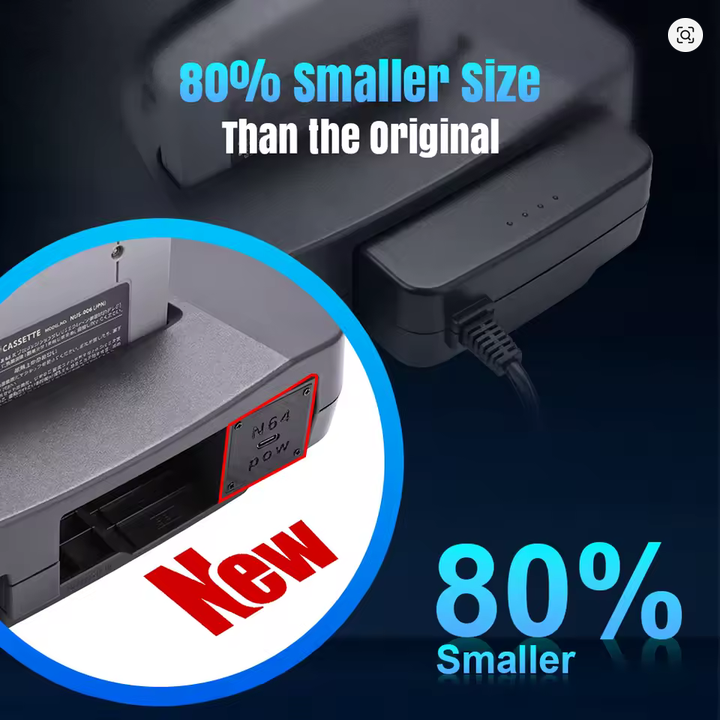
And a USB-C conversion for the N64, which conveniently is super tiny compared to the original!
 Finally, I managed to find a Lenovo power supply which should work with the PC. This one is designed for the 12V cigarette lighter connector.
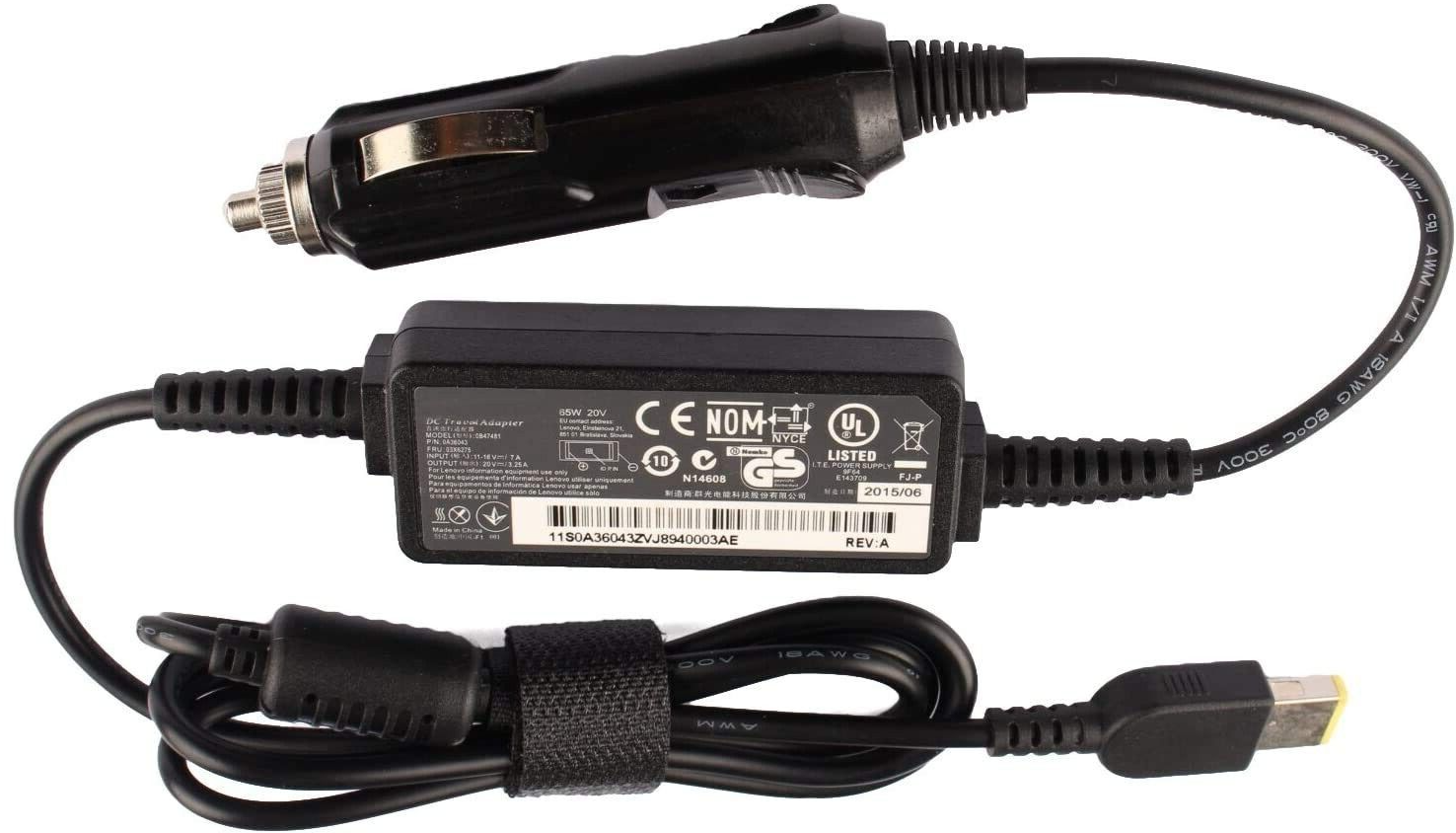
Once I got the power all contained in the box, that means I can wheel it out in a random forest and play games, and find random people who want to 1v1 me. No more outlets, no more extension cables! And apparently DC setups are more efficient than having to invert AC, which will be great for maxing runtime.
I’m excited about this progress!
2026-09-12
I just had a thought for the name of this portable gaming setup. Since it’s in a carry-on compatible case, we could call it, “Travel64”